Stone Wall 193: A Handcrafted Digital Asset for Professional Projects
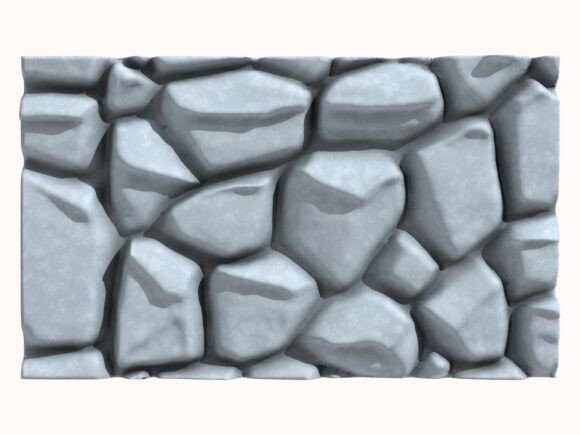
In the world of digital creation, the quality of your foundational assets can determine the success of your entire project. Stone Wall 193 is not just another 3D model; it represents a meticulously handcrafted asset designed for serious architectural visualization, immersive game environments, and precise 3D printing. Many creators rush to use generic models, overlooking the subtle details that separate amateur work from professional results. This wall model, built entirely manually in Cinema 4D without AI shortcuts, offers a level of authenticity and structural integrity that is often missing from automated or low-detail assets.
The Critical Importance of Model Provenance and Detail
A common and costly mistake is selecting a 3D model based solely on its immediate visual appeal in a render, without investigating how it was created. Many models today are generated or heavily assisted by AI, resulting in meshes that can be inefficient, non-manifold (containing errors), or lack coherent topology. For professionals, this isn't just a minor inconvenience; it directly impacts workflow efficiency, real-time performance in game engines, and the success of physical 3D prints.
Stone Wall 193 bypasses these issues entirely. Because it was fully designed and built by hand, its polygon structure is clean and optimized. Each stone, mortar gap, and surface irregularity is intentionally placed. This matters profoundly. In architectural visualization, an ill-formed mesh can cause unrealistic light scattering or ugly shadow artifacts. For 3D printing, a non-manifold mesh can simply fail to print, wasting time and material. Choosing a genuinely hand-modeled asset like this is a preventative step against these technical failures.
Navigating the Multi-Format Package
The package includes the model in C4D, STL, OBJ, FBX, ABC, and DAE formats. This breadth is a significant advantage, but a typical oversight is not understanding which format is right for your specific task. Using the wrong one can lead to lost material data, incorrect scaling, or missing animation rigs.
- C4D: The native format. Use this for the most precise control within Cinema 4D, preserving the original hierarchy and materials.
- FBX & DAE: Excellent for transferring to most game engines (like Unity or Unreal) and other 3D software, as they often support material and texture transfers.
- OBJ: A reliable, widespread format for general import into many applications, though material information can sometimes be simpler.
- STL: Specifically for 3D printing. This format contains the solid geometry without color or material data, ready for slicing software.
- ABC (Alembic): Used for complex scene caching and exchange in animation and VFX pipelines.
A better approach is to assess your final destination software first. If you are 3D printing, download and use the STL. If you are moving the model into Blender for a game asset, the FBX is likely your best starting point. This pre-selection saves time troubleshooting import errors later.
The Value of High-Resolution Reference Renders
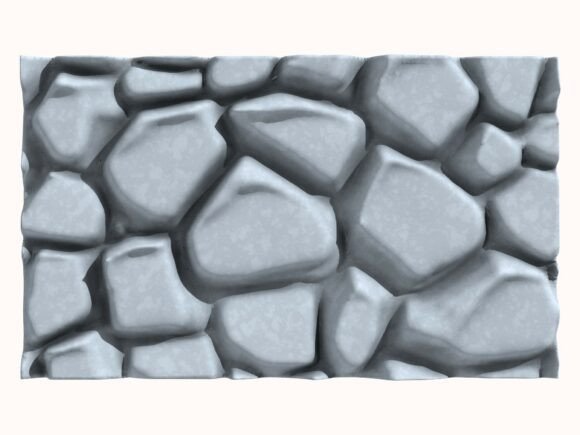
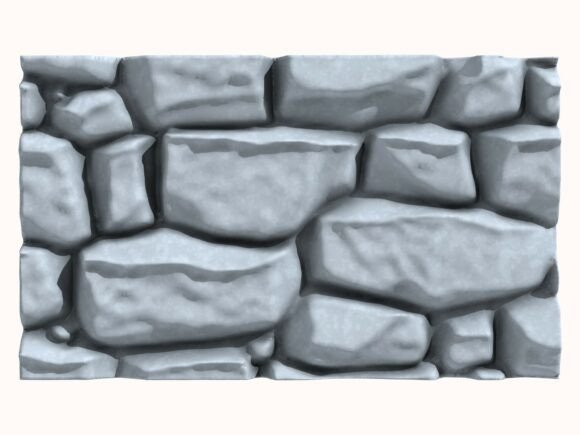
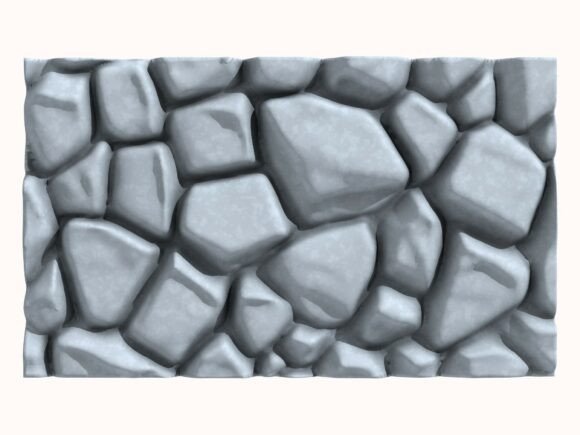
The included six high-resolution JPEG renders (2000x2000px at 300 DPI) are more than just promotional images; they are a vital tool for pre-purchase evaluation and in-project reference. A mistake is to glance at them quickly and move on. These renders showcase the model from various angles, allowing you to inspect the level of detail, the texture of the stone, and the model's overall silhouette.
Before committing to any 3D asset, you should use these renders to ask critical questions: Does the stone variation look natural? Does the geometry fit the aesthetic of my project (e.g., medieval ruin vs. modern garden wall)? Are the shadows and lighting in the renders consistent with a physically plausible object? This analysis helps avoid the disappointment of downloading a model that looks perfect in one promotional angle but has awkward or repetitive geometry when viewed from another.
Integrating the Asset into Your Workflow
Once you have acquired Stone Wall 193, another common pitfall is treating it as a final, unchangeable object. The best use of a high-quality base model is as a foundation. In Cinema 4D or your chosen software, you can instance it, break it into sections, modify its materials, or combine it with other geometry to build larger, unique structures. For example, you might use several instances of the wall to create a full castle enclosure, applying different texture maps to each section to avoid visual repetition.
For 3D printing, remember to scale the STL file appropriately in your slicing software and consider the printing medium. The model's handcrafted detail may be exquisite, but printing it at a very small scale could lose some finer cracks. Testing a small section first is a prudent approach.
Why Manual Modeling Matters for Your Final Output
The emphasis on non-AI, handcrafted work is not merely a philosophical stance; it has practical repercussions for your project's credibility. In client presentations, especially for architectural visualization, being able to speak to the authenticity and deliberate design of your assets adds a layer of professional trust. It shows conscientious sourcing. Similarly, for indie game developers, using assets with clean, manual topology often leads to better performance and easier customization, which is crucial when tweaking assets to fit a unique game world.
When evaluating any 3D model, you should check for statements about its creation method. If it's unspecified, assume it may be auto-generated and proceed with caution, testing it in a sandbox project first. With Stone Wall 193, that due diligence is already answered, providing a reliable starting point that won't introduce hidden problems downstream.
The final piece of advice is to match the asset's strengths to your project's core needs. If you require a realistic, geometrically sound stone wall that can be trusted in professional software and physical printing, this model is engineered for that purpose. If your need is for a hyper-stylized or cartoonish wall, this asset's authentic detail might be excessive, and a simpler model could suffice. Making this distinction before purchase ensures satisfaction and efficient use of both your time and creative resources.
By understanding the technical advantages of its multi-format support, leveraging the reference renders for evaluation, and appreciating the workflow benefits of a clean, hand-modeled mesh, you can integrate Stone Wall 193 not just as a model, but as a robust, problem-solving component in your creative toolkit.